How it works
How automatic time tracking actually works
No magic and no guessing. Five signals read from the operating system, sampled continuously, assembled into a timeline you correct rather than a form you fill in.
In short
An automatic time tracker samples which application and window has focus, counts keyboard and mouse events without recording them, and reads how long it has been since your last input. Those signals become a timeline of the day, split into active and idle stretches. You review it, assign it to projects, and invoice from the result.
Set up automatic time tracking in about 60 seconds
Up before your coffee gets cold. No config files, no integrations to wire up, no timers to remember.
-
Download the app.
Mac or Windows. Sits in the menu bar or the tray and starts tracking the moment you log in.
About 30 seconds
- A signed native binary, not a bundled browser. Separate builds for Apple silicon, Intel Macs and Windows.
- No administrator rights on Windows, and no permission at all is required on either platform to track time.
-
Then just work.
No sessions to start. No projects to tag. Stunda watches app focus, detects idle time, and builds your timeline automatically.
Zero friction
- Focus is sampled every few seconds, input activity several times a second. The counts are of events, never of what was typed.
- Thirty seconds without input marks the stretch idle. Idle is shown separately, never deleted and never billed on your behalf.
- It keeps running with the network down. Sessions are written locally first and reconciled when the connection returns.
-
Review, invoice, repeat.
End of the week: open the dashboard, see where your time went, drag tracked hours into an invoice, send it. That's the whole loop.
Billing takes 4 steps
- Assign time to a project once and the same evidence maps to the same project next time.
- Billable is a property of the project, so internal work stays off the invoice without a decision per entry.
- Amounts are summed in whole cents per row rather than recomputed from rounded hours, because the two do not agree.
The five signals, and what each one is for
Every one of these is a documented operating system API. Nothing here inspects document contents, and nothing runs as a service you cannot see.
| Signal | How it is read | What it gives you |
|---|---|---|
| Application and window focus | Sampled every few seconds from the operating system. | The per-app breakdown, and the evidence that says which project an hour belonged to. |
| Keyboard and mouse event counts | A running total on macOS, sampled key state on Windows. Counts only, never content. | The difference between an hour of work and an hour of an open window. |
| Seconds since the last input | A system-wide idle reading that keeps working while the app is in the background. | The idle split. Thirty seconds is the threshold. |
| Real elapsed time | Read from a sleep-inclusive clock, cross-checked against an awake-only one. | Sessions that end at the sleep boundary instead of billing through a closed lid. |
| Window titles and page addresses (macOS) | Read once you grant the Accessibility permission: the window title and the active tab's host and path. Query strings and fragments stripped before storage. Windows records app names only. | App names becoming project names, without storing search terms or session tokens. |
The implementation differs by platform, because the APIs do. What it reads on macOS and what it reads on Windows are written out on their own pages, including the one Windows limitation worth knowing about.
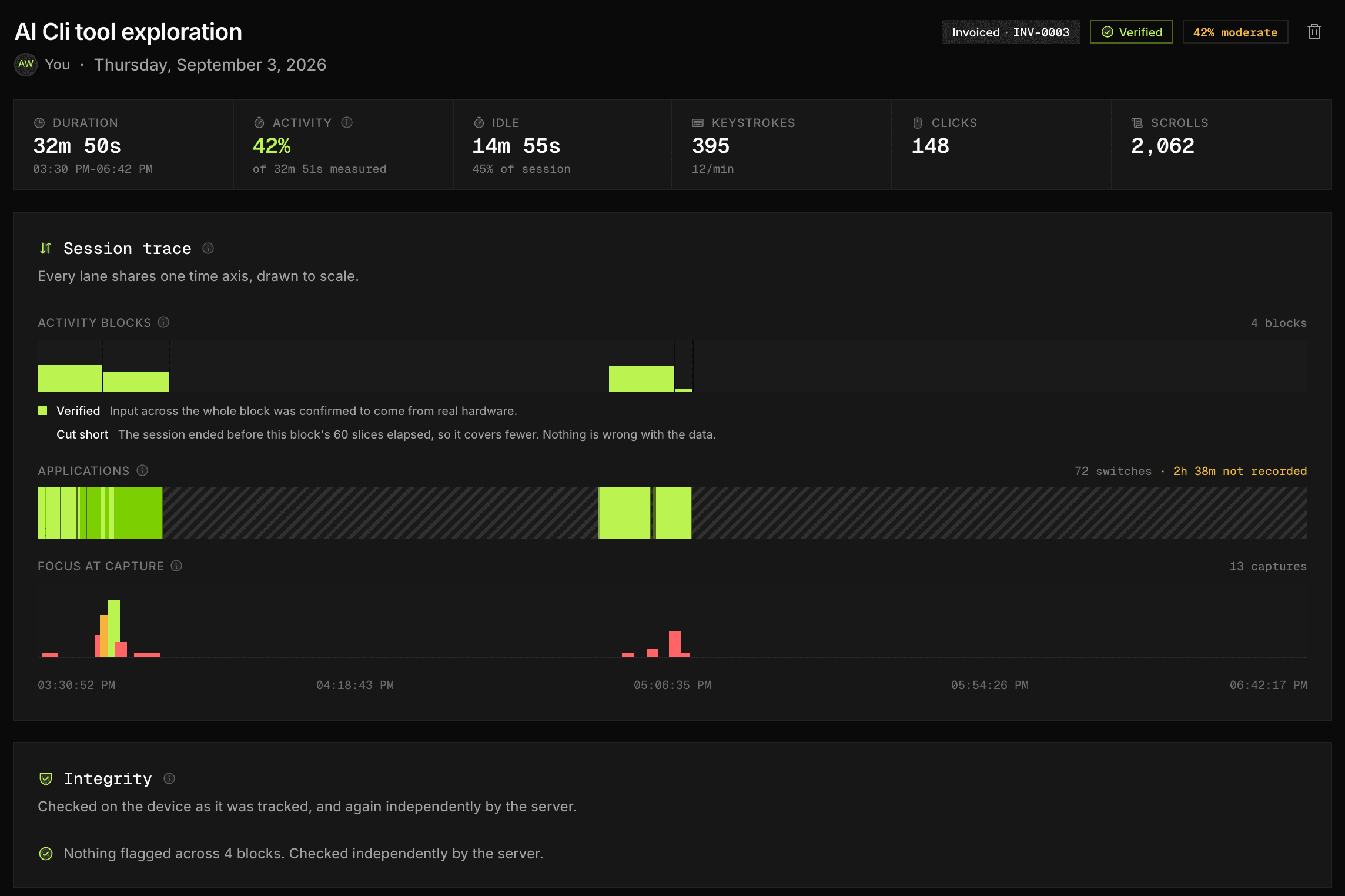
While you read that, it was already measuring.
No timer was started. No project was tagged. This is one tracked Thursday, drawn to scale, exactly as Stunda records it.
Hover or tap a block to see what was in it
9:00 AM to 10:45 AM Meridian Client dashboard 1h 45m $148.75
10:45 AM to 11:05 AM Away 20m Idle, never billed
11:05 AM to 12:30 PM Meridian Client dashboard 1h 25m $120.42
12:30 PM to 1:15 PM Lunch 45m Idle, never billed
1:15 PM to 3:00 PM Vantage API integration 1h 45m $148.75
3:00 PM to 3:20 PM Slack 20m Admin, not billed
3:20 PM to 5:10 PM Vantage API integration 1h 50m $155.83
5:10 PM to 5:30 PM Away 20m Idle, never billed
5:30 PM to 6:30 PM Kestrel Brand refresh 1h 00m $85.00
- Tracked
- 9h 30m
- Captured with no timers started
- Billable
- 7h 45m
- Idle and admin already deducted
- Value at $85/hr
- $658.75
- Ready to drop into an invoice
The three things that usually go wrong
Automatic tracking is easy to build badly, and the failures are specific. These are the ones worth checking in any tracker you evaluate, ours included.
-
Sleep is counted as work
The monotonic clock most code reaches for stops while a machine is asleep on some platforms and keeps running on others. Get it wrong in one direction and an overnight session reports three minutes; get it wrong in the other and it reports nine hours. Stunda reads both clocks and ends the session where the machine slept.
-
Idle is silently billed, or silently deleted
Both are wrong, because both take a decision away from you. Forty minutes with a document open might have been a meeting about that document or might have been lunch. Idle stretches are kept, marked, and shown next to the active ones.
-
The record stops when the network does
A tracker that needs a connection is a tracker that loses your flight, your train and your unreliable hotel. Sessions are written to a local database first and reconciled when the connection returns.
Questions about tracking
How does automatic time tracking actually work?
The app samples which application and window has focus every few seconds, and counts keyboard and mouse events several times a second. That produces a timeline of your day with an activity level attached to each stretch, which you then review and assign to projects. Nothing needs to be started or stopped.
What data does Stunda collect?
Keystroke counts, mouse clicks, active window names, and idle time. We never log keystroke content, clipboard data, webcam footage, or screen recordings. Privacy is a core design principle, not an afterthought.
What happens to time when I step away from my desk?
After thirty seconds with no keyboard or mouse input the stretch is marked idle and shown separately. It is neither deleted nor billed automatically, so you decide which of it was a meeting and which was lunch with the timeline in front of you.
Will it bill me for time my computer was asleep?
No. A suspend ends the session at the point the machine slept. Stunda reads both a sleep-inclusive and an awake-only system clock precisely so that closing a laptop cannot produce hours nobody worked.
Can I use Stunda offline?
Yes. The desktop app keeps tracking if your internet drops, so a flight, a dead hotspot or a flaky cafe connection never costs you a session. Sessions are written to a local database first and synced when the connection returns.
Can I edit or delete tracked time?
Yes. The automatic timeline is a draft: you can split, merge, reassign and delete entries, and add manual ones for work away from the computer. The tracker produces the raw material, not the final answer.
Does it track which websites I visit?
On macOS, yes, once you grant the Accessibility permission: while a timer runs, Stunda records the window title and the address of the active browser tab (host and path, so a full page address minus its query string). Query strings and fragments are stripped before anything is stored, because they carry search terms, session tokens and document ids that a timesheet has no business holding. On Windows it records application names only.
Still measuring, since the moment you opened this page
You've been here 2:40.
That's $3.78 unbilled.
That's how it slips away: a few quiet minutes at a time, on every project. Stunda catches them all day, silently, and turns them into invoices that send in four steps.
Free forever for solo freelancers. No card required. Setup takes 60 seconds.